Search this blog for other interesting articles

Showing posts with label error. Show all posts

Friday, 30 September 2011

Transport Error – Transport Control Program tp ended with error code 0247

This article answers the following queries:
  • How to resolve the transport error “Transport Control Program tp ended with error code 0247?
  • How to resolve the transport error – Errors: addtobuffer has problems with data- and/or cofile?
  •   How to resolve transport issue  encountered while adding a transport to import queue of target       system?
--------------------------------------------------------------------------------------
Sometimes, while you are adding a transport request into import queue of target system as shown below, you might encounter error as
 “Transport Control Program tp ended with error code 0247 "?
Errors: addtobuffer has problems with data- and/or cofile? (Please refer screenshot 3)


After pressing Yes in the above screen, you may encounter below error:


Most probable reasons for this issue could be, due to transport did not get released from the source system.
Please login to the source system of the transport and goto transaction SE01 and provide the transport number as shown below and click on display pushbutton to view the release status of the transport


In the below screen, please drill down the transport and check whether all the transports under this are released ( if there is tick mark after the transport, it means it was released).
If there is no tick mark on any of the  transports below the given transport number it means the transport is not yet released. In those cases, you can even view truck symbol in the active state.


In the above screenshot, all the underlying transports were released(as there is tick mark after those transports), but the main transport is not yet released as indicated my active status of the truck. In these cases, just keep the cursor on the main transport number and click on truck symbol to release the transport.
Please note that you can release the transport only if you have access to do the same. If basis administrator do not have access, he/she should approach the respective team and get this transport released as per the process mentioned above.


Please find below another scenario, in which 2 of the 3 child requests not released. In this case, each of the individual transport to be selected and released (by clicking truck button) and finally release the main transport.


Once the main transport is released, data file and  cofiles will be generated for that transport request in the source system. Then no longer, the error mentioned above will be encountered will adding the transport request to import queue of the target system as the request was released and data and cofiles were also generated under /usr/sap/trans/data and /usr/sap/trans/cofiles directories of the system.


Related Link:


Enter your email address:


Delivered by FeedBurner


Thursday, 15 September 2011

How to check transactional RFC(tRFC) related errors?

This article answers the following queries :


  • How to check transactional RFC (tRFC) related errors?
  • How to find out status of transactional RFCs(tRFC) in SAP?
  • What is the transaction used to perform transactional RFC checks?
  • How to re-process failed or stuck LUW related to transactional RFC?
  • How to delete a transactional RFC related LUW from sap system?
  • How to reprocess all the transactional RFCs or LUWs that are stuck in SAP system at a time?
-------------------------------------------------------------------------
Transactional RFC related checks and maintenance can be done using SM58 transaction code
Sometimes, in real time scenario you can face following issues :

  • Process chain related performance issues in BIW system due to transactional RFCs stuck in R3 system.
  • Idocs flow not happening from R/3 to XI system

In these scenarios, SM58 transaction code will be useful to find out stuck tRFCs and action them accordingly.
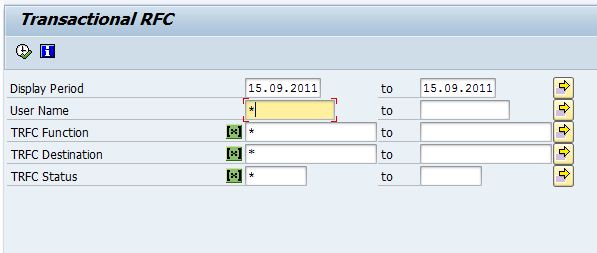
Please login into SAP system and use SM58 as shown below :


Using  SM58, we can select TRFCs based on

  •  Any  2 dates
  •  User id
  •  Function of TRFC
  •  TRFC Destination
  •  TRFC Status

If you would like to list all, then use * as input in these fields

In the following screen, you can see the list of TRFCs that are waiting to be processed or stuck tRFCs as shown below


We can delete or re-process these LUWs based on the scenario. This can be done by navigating to Edit menu as shown below


You can reprocess an tRFC  LUW, by selecting the same and  by navigating to Edit -> Execute LUW. This can also be done by  pressing F6 button.

An LUW can also be debugged by navigating to Edit -> Debug LUW option
In case large number of tRFCs are stuck, all of them can be processed at a time by selecting
Edit -> Execute LUWs option as shown in the above screen.


You can also directly goto QRFC administration and QOUT scheduler from  SM58 transaction  as shown in the below screen.


Search this blog for other interesting articles

Please subscribe & activate link received to your email id to receive latest articles

Enter your email address:

Delivered by FeedBurner