This article answers following queries:
- How to identify database tables that are being accessed by a given ABAP program?
- How to identify underlying database tables for a given background job?
- Process to be followed to identify tables that are accessed by an ABAP program?
- Process to be followed to identify tables that are accessed by a background job?
- How to identify ABAP program for a given SAP background job?
==================================================
In real time, we may face several scenarios like
i)
Background job is processing slow
ii)
ABAP program is taking long time to complete
execution
iii)
Log_dir is getting full very fast
In the above cases, Basis team should closely work with
database teams and may have to identify the reasons behind them to resolve the
issues.
Example1: If background job (or an ABAP program) is
taking more time to complete, one of the reasons could be statistics for underlying
database tables that this job is accessing were not up to date. We may have to
run statistics to fix the performance issue.
Here we need to know which database table(s) is/are being
accessed by job/abap program.
Example2: If a background job is running for long
duration and log_dir at Operating System level is reaching very high levels
(ex: crossing 60% usage), then the reason could be there is an issue with underlying
abap program. If single or multiple processes running for long time without
commiting work to the database, log hold up will happen and log_dir usage will
increase. If it crosses 70%, SAP system will face performance issues and if it
reaches 100%, system wouldn’t be accessible.
To resolve this issue, developers need to modify ABAP program & make sure there are frequent commit statements. In this case also, database team may request us to provide list of tables that are being accessed by this job or program.
To resolve this issue, developers need to modify ABAP program & make sure there are frequent commit statements. In this case also, database team may request us to provide list of tables that are being accessed by this job or program.
So, in this article I’m covering that process of identifying
database tables that are being accessed by an ABAP program or a background job.
First of all, I will cover the process of identifying
underlying ABAP program for a given background job. Let us say you want to
identify, underlying program for SAP standard job BI_WRITE_PROT_TO_APPLLOG.
Goto SM37 transaction code and provide name of the job
you would like to find abap program for and execute the same:

It results in below screen:
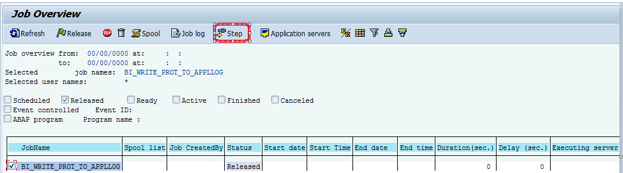
In the above screen, select the job and click on step icon (highlighted) which results in below screen

RSBATCH_WRITE_PROT_TO_APPLLOG is the underlying abap
program for the given background job BI_WRITE_PROT_TO_APPLLOG. Similarly, we
can identify program for any background job.
Now, our next task is to identify database tables that
are being accessed by RSBATCH_WRITE_PROT_TO_APPLLOG program or BI_WRITE_PROT_TO_APPLLOG
job.
Go to SE38 transaction and provide program name:

In the same screen, navigate to Utilities ->
Environment Analysis as shown below

It will result in below screen.

As we need only database tables, please deselect all
ticked options by clicking highlighted icon and select only database table
check box and execute (as shown below).

It will result in below screen, which lists the database
tables that are being accessed by this program.

This is the process to identify database tables for a given
background job or an ABAP program.


