Search this blog for other interesting articles

Showing posts with label utility. Show all posts

Wednesday, 29 July 2020

Define Value, Utility and Warranty in ITIL terminology

Value is perceived by the customer by following two elements of a service

ü  Utility (Fitness for purpose)

ü  Warranty (Fitness for use)


Utility is derived from the attributes or functionality of the service that have a positive effect on the performance of objects, tasks, activities associated with desired outcomes. Elimination or removal or relaxation of constraints on performance is also perceived as a positive effect.

Warranty is derived from the positive effect being available when needed, in enough magnitude or capacity and dependably in terms of continuity security and support.

 Utility is what the customer gets, and warranty is how it is delivered.

Customers can’t benefit from something that is fit for purpose but not fit for use and vice versa. It is beneficial to separate the logic of utility from the logic of warranty for purpose of design, development and improvement.

Utility and warranty are the key aspects throughout the service life cycle from conceptualization to design, testing and validation, operations (monitoring and control) and continuous improvements.


Services – Value Creation


Sunday, 5 July 2015

What is the use of database utility in SAP?

This article answers following queries:

  • How to remove entries from the tables in SAP?
  • What is the use of SE14 transaction in SAP?
  • What is the use of database utility in SAP?
  • How to invoke database utility in SAP?


------------------------------------------------------------------------

The database utility is the interface between the ABAP Dictionary and the relational database underlying the R/3 System. This tools allows you to edit database objects derived from objects of the ABAP dictionary.

Using database utility, we can create, delete and adjust to changes to database objects definition in the ABAP dictionary.

SE14 transaction is used for invoking database utility.

As part of post system refresh activities, we need to remove entries from specific tables (mentioned below), activate and adjust the database.

Table List

ALCONSEG
ALSYSTEMS
DBSNP
MONI
OSMON
PAHI
SDBAD
SDBAH
SDBAP
SDBAR
TPFET
TPFHT
TLOCK
SWNCMONI
SAPWLSERV
SWNCMONIINDEX

Process for removing entries, activating and adjusting the database is mentioned below.

Go to transaction SE14. It will result in below screen.


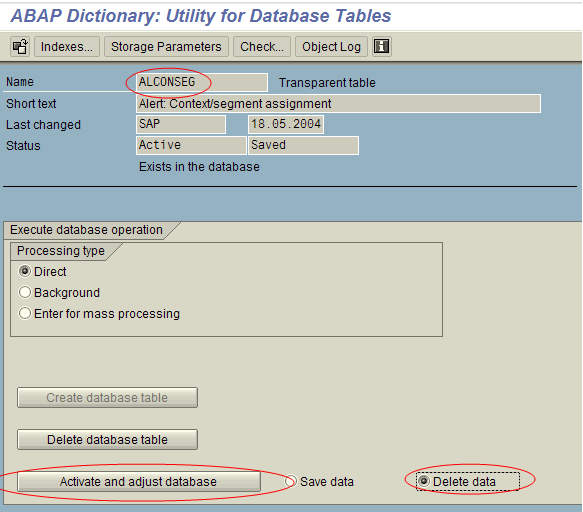
Please provide table name in the object name text box and select “Tables” radio button and click on edit as shown above. It will result in below screen.


In the above screen, make sure Processing type is selected as “Direct” and select “Delete data” radio button and click on “Activate and adjust database” button (as shown above).


The above message will appear at the bottom of the screen indicating success of the transaction.

In the above example, I have documented the process to be followed for deleting entries of ALCONSEG table. However, as part of post system refresh activities, this process to be carried out for each of the above mentioned tables.


Search this blog for other interesting articles

Please subscribe & activate link received to your email id to receive latest articles

Enter your email address:

Delivered by FeedBurner