Search this blog for other interesting articles

Showing posts with label tcode. Show all posts

Monday, 22 June 2015

How to lock or unlock transaction code (tcode) in SAP system?

This article answers following queries:

  • How to lock transaction code (tcode) in SAP system?
  • How to unlock transaction code (tcode) in SAP system?
  • How to view list of tcodes that are locked in SAP system?
  • Which tcode is used to lock or unlock tcodes in SAP system?
  • How to identify whether a tcode is locked or not in SAP system?
  • While trying to execute a tcode in SAP system, it says “Transaction is locked”. What’s the reason?
  • What is the report to identify locked transactions in SAP system?


-------------------------------------------------------------------------------------

Sometimes, there might be a business requirement to lock a particular transaction in SAP system (for a particular period) so that no one is allowed to execute those transactions

For eg: Lock SE38 so that users are not allowed to execute reports
           Lock STMS_IMPORT so that users are not allowed to import transport requests etc.


Which tcode is used to lock or unlock tcodes in SAP system?

SM01 tcode is used for locking transactions or tcodes.


Locking Procedure:

Login to SAP system and go to transaction SM01. It will result in screen as shown below:


For example, I am demonstrating process to lock tcode SM02.

Type the tcode you would like to lock in the above screen and press search icon which displays that particular transaction.


If you would like to lock that tcode, tick that checkbox next to that transaction and click on save button to reflect the change.

After that, if locked tcode is executed by any user, it won’t get executed. It will display a message mentioning “Transaction SM02 is locked” (as shown below).


Unlock Procedure:

In case, you would like to unlock this transaction, go to SM01, select the tcode, and untick the checkbox and press save button.

It unlocks the transaction and everyone would be able to execute that transaction.

Note:

  • In some versions of SAP systems, lock/unlock toggle button will be there to lock or unlock transactions( as shown below). So, instead of simply clicking Save button, you may have to click "lock/unlock" button. 

Please note the difference and act accordingly
  • If you lock / unlock a tcode in a particular client, it is applicable for all the clients of that SAP system. It means, if you locked a tcode in 100 client of an SAP system, this tcode will get locked in all other clients of that SAP system. So, this is system wide change and not client specific


How can we find if a tcode is locked or not?

In SM01 transaction, if you find tick mark enabled for a tcode, it means that specific transaction is locked.

Or

If you try to execute that tcode “Transaction xxxx is locked” message will be displayed

How to view list of tcodes that are locked in SAP system?

If you would like to view all transactions or tcodes that were locked in that SAP system, you can find out by navigating to SM01 à Transaction Code à Press F6 or select Display Locked Transactions (as shown below)


Once it is selected, it displays list of locked transactions as shown below:


RSAUDITC report can be executed through SE38 or SA38 to find out list of locked transactions in SAP


Wednesday, 30 November 2011

How to find out who are all having access to a particular tcode in SAP system?

This article answers the following queries

  •  How to find out who are all having access to a particular tcode in SAP system?
  •  How to find out which user ids are having access to a transaction in SAP system?
  • How to use SUIM tcode to identify users having access to a particular transaction in SAP system?
-----------------------------------------------------------------------------------------

In some real time scenarios, if there is an emergency like, a  change to a table to be done but particular end user doesnot have access to change the tables.  Then they may approach basis administrator/security(authorization) consultant to identify those users who are having that access so that they can request them to change the same in case of emergencies. So, you should be able to identify those users and confirm to business users.
In general, basis/authorization consultant should be able to identify all user ids who are having access to a particular tcode. This can be done in the following way.
In this example, am demonstrating how to identify all the users who are having access to SE16 in a given SAP system.
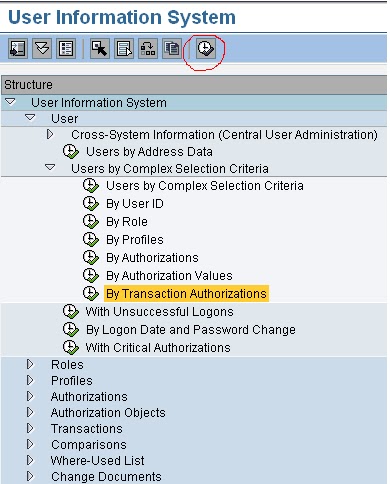
Login to the SAP system and go to transaction SUIM as shown below :


In the above screen, please navigate to user -> users by complex selection criteria -> By Transaction Authorizations (This is highlighted in the). Select that and click F8 or clock symbol (highlighted)  to execute. This results in the next screen as below :


In the above screen, type any transaction code, which you would like to find who are all the users having access for the same. In our example, it is SE16.
Once you input transaction code, click on highlighted clock button, which results in the following screen which displays the list of users who are having access for SE16 in this SAP system.


Wednesday, 24 August 2011

Important SAP Basis Transaction codes - 3


Hi Everyone, this article lists some of the very important SAP Basis Tcodes which are useful on day to day basis for SAP basis administration.


SM63                     Display/Maintain Operation Modes
SM64                     Used to trigger an event
SM66                     Global work process overview
SM69                     Maintain external operating system commands
SMLG                    Used for Logon group maintainance
SMLI                      Used for Language Import
SMLT                     Used for Language Administration
SP01                      Spool control. Used to view spool related details
SP02                      Used to display output request details
SP11                      Temse table of contents
SP12                      TemSe Administration
SPAD                     Spool Administration and Printer Configuration
SPAM                    SAP Support Pack Manager
                            ( Used for performing SAP support pack upgrade)
SPAU                     Display modified objects in the runtime environment
                            This tcode is used during SAP support pack upgrade
SPDD                     Displays modified DDIC objects
                                This tcode is used during SAP support pack upgrade
SPRO                     Customizing : Initial Screen
ST01                       SAP system trace
ST02                       Used to view all the SAP R/3 buffer statistics
ST03                       Used to perfrom workload analysis
ST04                       Used to view various statistics of RDBMS activities
ST05                       Used to take SQL Trace
ST06                       Operating system Monitor
ST07                       Application Monitor
ST10                       Table call Statistics
ST11                       Display developer traces
ST22                       ABAP runtime error analysis. Analysis of dumps
STMS                     Transport Management System
STUN                     R/3 Performance Menu
SU01                      User Maintenance
SU01D                   User Display
SU10                      Mass changes to User masters. Mass user maintenance


Enter your email address:


Delivered by FeedBurner


Important SAP Basis Transaction codes - 2

Hi Everyone, this article lists some of the very important SAP Basis Tcodes which are useful on day to day basis for SAP basis administration.


SE01                       Transport Organizer
SE03                       Workbench Organizer Tools
SE06                       Set up workbench organizer
SE07                       Display status of transport system
SE09                       Workbench Organizer
SE10                       Customizing Organizer.
                               This is used to view transport requests based on type, 
                               user etc
SE16                       Display table contents
SICK                       SAP Initial installation consistency check
SM01                     Used to lock transactions
SM02                     To post system messages in case of planned or scheduled
                               downtime of SAP systems
SM04                     Local user list
                               (It means it lists users belonging to only that instance you 
                               have selected)
SM12                     Used to display and delete SAP locks
SM13                     Used to display update records
SM21                     System log. It contains very important system messages
                              and will be useful for troubleshooting most of the issues
SM28                     SAP Initial installation consistency check (Same as SICK    
                             tcode)
SM30                     Call view maintenance
SM31                     Table maintenance
SM35                     Batch Input Monitoring
SM36                     Schedule Background Jobs
SM37                     Overview of background jobs
SM50                     Overview of work processes
SM51                     Overview of Instances
SM56                     Number range buffers
SM58                     Asynchronous RFC error log
SM59                     RFC connections maintenance like creation, modification etc


Enter your email address:


Delivered by FeedBurner


Important SAP Basis Transaction codes - 1


Hi Everyone, this article lists some of the very important SAP Basis Tcodes which are useful on day to day basis for SAP basis administration.


AL08            Global User overview
                   ( Lists all the users of all the instances of the SAP system )
AL11            Display CCMS operating system files
AL12            Buffer synchronization
DB02            Missing database objects and space requirements
DB13            Scheduling (Used for scheduling various standard jobs like                                 
                    checkdb, backups etc)
FILE             This tcode is related to archiving.This is used to map assignment                       
                     between logical and  physical names
OSS1            SAP service marketplace logon
PFCG            Used for Role maintenance
RZ01             Graphical background job scheduling monitor
RZ03             This is control panel for operation modes and server states.
                     Operation mode can be chosen using this Tcode
RZ04             Used for maintenance of operation modes and instances
RZ10             Used for profile maintenance and changing SAP parameter values
RZ20             Alert Monitor
RZ21             Alert monitor customizing
SA38             To execute an ABAP program
SALE              IMG Application Link Enabling
SCC1              Copy client via transport request
SCC3              Client copy Log
SCC4              Client Administration
SCC5              Delete Client
SCC6              Client  Import
SCC7              Client Import post processing
SCC8              Client Export
SCC9              Remote Client copy
SCCL              Local Client copy


Thursday, 30 June 2011

What are the different transaction codes related to client operations in SAP ?

This article answers the following queries :


  • What are the different transaction codes(Tcodes) related to client operation ?
  • How to maintain new client entries in SCC4 ?


Following are the important Tcodes which are useful for various client operations in SAP.


 SCC4 : This transaction is used to list all the clients that are present in the SAP system. This also includes details like :


  • Last changed date of the client
  • Last changed by
  • Logical system name associated with the client
  • Client role

Using this transaction, a new client details can be maintained as below :

i)   Press change icon to be in change mode
ii)  Click on “new entries” push button to create new client details


All the client details that are available in SCC4 are present in the T000 table in the backend.


SCC5  :  This transaction is used to delete a client from an SAP system

SCCL  : This transaction is used to perform local client copy in  SAP system

SCC9  : This transaction is used to perform remote client copy in SAP system

SCC3  : This transaction is used to monitor client copy progress

SCC8   : This transaction is used for client export

SCC7   : This transaction is used to perform client import post processing  
            activities


Enter your email address:


Delivered by FeedBurner

Friday, 20 May 2011

SAP Basis Daily Monitoring Tcodes


Proactive monitoring of the SAP systems, will help to understand issues in advance & helps us to take corrective actions and  thus will lead to lesser downtime of the systems, improving profitability of the business organisation.

 Monitoring can be focused on ABAP stack(including database checks), Java Stack and Oslevel checks.


ABAP Stack Checks :

SM50 : (Process Overview)


This transaction code will be useful to view the processes that are running currently in an sap insance. In this view you can check whether there are free workprocesses to execute the processes. If all the workprocesses are in running state and no work process is idle it means that wait times will increase for the processes that are waiting in the dispatcher queue leading to performance degradation. If you find that there are no free workprocceses for maximum times that you may consider, increasing the number of workprocesses.


SM66 : (Global process overview)


This transaction code will be useful to view the processes that are running across all instances/application servers of a SAP system. Similar to SM50 checks can be done in this transaction as well.

SM51 : (Application servers status)


This transaction code will be useful to view all the hostnames and application servers status. If any application server is down, the same can be identified using status of the server column. We can also figure out different Message types (Dialog, Batch, Update, Upd2, Spool, ICM etc) configured for the respective servers.

SM12 : (Lock entry list)


This transaction code will be useful to view all the sap locks that are present in the system. As part of monitoring, we need to look for any old sap locks that are more than 1 day. If any such locks, we need to analyse the reason for that lock for such longer duration and take actions accordingly. A lock can be set for such a long duration due to a long running background job or a lock is not released due to an application error or a program terminated abruptly but lock not released etc.


How to delete a sap lock?


ST22  : (ABAP Dumps )


This transaction code will be useful to view all the abap dumps that have occured in the system on a given day. As part of daily monitoring, it is the responsibility of the basis administrator to analyse the dumps and take necessary actions to avoid issues.

Some of the examples of abap dumps are timeout issue, database space issue, spool overflow issue etc

SM21 : (System log)


This transaction is useful to view the log of the sap system for various operations. This log will be very useful to identify various issue in advance and to take necessary measures. System log is the place to check out for any timeout, network issues, database space issues, message server issues, spool overflow, locktable overflow etc issues.

Additional details :

SAP System log

SM13 : (Update Requests overview)


This transaction is useful to figure the status of update system. Incase an update is inactive we can figure out the same from this transaction and necessary action can be taken and update can be activated again.


Update got deactivated. what is the reason for update deactivation? How to activate the update ?


SM14 transaction can be called internally from SM13. These both transactions are useful for update administration.

In SM13, you can select status (canceled, to be updated, v1 executed, v2 executed, all ) and time interval during which you would like to view the status execute to check the overview of updates as per the status and time interval selected.

In case of canceled updates, analysis to be done whether to repeat update.

ST02 : (Tune summary )


This transaction will be used to monitor

  •  Buffer statistics like hitratio, swaps, db access details, size of buffer and free size of buffer etc

  •  Important statistics related to  Roll area, Page area, Extended memory and heap memory

  • Call statistics like select, insert, update and delete

As a basis administrator, it is our responsibility to ensure there is more hit ratio for the buffers and less swaps to ensure efficient performance of the sap system. In case you see there are more swaps and less hit ratios for most of the buffers, then tuning buffers to be carried out to ensure optimal performance.
 
DB12 (Backup logs) : This transaction is useful to check the details of
 
  • last successful backup
  • overview of database backups ( Success / failure of backup with log details)
  • Archiving directory status (Free space of oraarch )
  • Overview of redolog files ( Number of redologs that are not yet backed up)
  • overview of redolog backups (Success / failure of backup with log details)
 
DB13 (DBA Planning calender) :


This transaction will be useful to schedule various database backups & clean up jobs like ( whole database backup offline/online, Full backup online/offline, incremental backup offline/online, redolog backup, update statistics, check db, cleanup logs, compress database, verify database, initialize tape and validate structure jobs).

In this transaction, you can also check the status of every job that was scheduled and can reschedule in case of failures.


DB14  (DBA operations log) :


This transaction will be useful to check the status of following :

  • Database backup
  • Redolog backup
  • BRSPACE log (extend tablespace issues etc)
  • BRCONNECT operations (Update optimiser statistics , database check etc)
  As an sap basis administrator it is our responsibility to check and ensure backups and other cleanup jobs are successful everyday. Incase of failures, should figure out root cause and take actions like rescheduling and ensure these jobs are successful.


SM37 ( Job status overview) :

This transaction will be useful to have an overview of jobs with different statuses.
As part of daily monitoring, SAP basis administrator should use this transaction to findout canceled jobs and active jobs(for eg: long running - more than 24hrs etc).

Incase of canceled jobs, root cause for the failure to be figured out from the logs of the respective job and to be actioned by rescheduling etc.
Incase of long running jobs, we need to figure out the reason for long running and action them accordingly.

In SM37, using extended job selection option, we can even select the jobs based on start condition, steps (like abap program, external command or external program), period etc


How to troubleshoot a background job running for long duration in sap?


ST04 (Database alert logs and performance) :


This transaction will be useful for (oracle) database administration. In this screen, goto Alerts and drill down further. Click on "Database Check" to find out any errors or warnings related to database like MISSING_STATISTICS, STATS_TOO_OLD, LAST_BACKUP_FAILED, LAST_ARCHIVE_FAILED etc. After going through the error or warning in details take necessary corrective actions based on the error like running update stats again, re-triggering backup etc

Under Alerts, you can view Alert monitor which will summarize status of the database under different heads like

  • Space Management
  • Performance
  • Backup/restore
  • SAP Consistency
  • Health
Drill down on each of these to find out potential problems. These are color coded for ease of administrator (Red for errors, yellow for Warnings and Green for OK status)

For Eg: If PSAPSR3 tablespace is >90%, you can see Space management in red color. Then it is the responsibility of Basis administrator to take necessary actions on the same.

SP01 ( Check Spool status ) :


This transaction is useful to find out the status of spool request and output request. In SP01 transcation, you can list the spool requests or output requests between a given interval.

In the list generated, you can check out the status of spool requests and findout any errors by drilling down further.

For eg: if so many spools are in waiting status, find out whether output device is available or not.

If many spool are in error status, figure out if there is any network issue and take necessary actions.


If  customers complain that they are not able print anything from SAP, check out whether there is any spool overflow.


SXI_Cache : This Tcode is specific to XI or PI system. This Tcode is used to findout whether cache refresh is happening or not. Incase if cache refresh is happening successfully, it will indicate the same in green color. Otherwise it will be in red indicating a problem with cache refresh.

If there is a problem with cache refresh then basis administrator has to troubleshoot the same.


SLDCHECK : This Tcode will be useful to figure out whether connection to the SLD system from the system on which you are testing is fine or not. In case the connection is fine, all checks will appear in green. Incase of any issues, it will appear in red or yellow and then basis administator has to troubleshoot it and make sure SLDCHECK is working fine.

Ensuring SLDCHECK is working fine is important to keep all systems in the landscape in sync.


SXI_MONITOR : This TCode is specific to XI or PI system. This transaction will be useful to figure out any errors or warnings in the processing of XI or PI messages. In case of any issues, this needs to be informed to functional team and should be troubleshooted accordingly with the functional team inputs.


DBO1 : This transaction code is useful to findout the database locks that are present in the SAP system.

As part of daily monitoring, SAP Basis administrator has to figure out if there are any long pending locks more than 1 day etc and analyse reasons for the same. Sometimes if programs/jobs got terminated abruptly without removing the database locks set, this will lead to performance issues as other programs which needs that lock cannot set etc and they have to wait indefinitely as these locks won't get released automatically. In case of any long pending locks, Basis administrators should contact DBA team if any an dfigure out the reason for these locks and action accordingly

Jack Stack Checks :  Please refer below links to understand Daily Java monitoring of SAP Landscape:


SAP Java monitoring check list 2

To monitor live Cache system, please refer below link :

Live Cache Monitoring in SAP


Please find below table which summarizes daily monitoring tasks that are to be performed by the SAP Basis Administrator :

 
</></></></></></></>
SnoTask
ABAP Stack Checks
1Check process overview(SM50)
2Check overall system process overview(SM66)
3Check application servers status(SM51)
4Check for any pending locks (SM12)
5Check for Dumps in the system(ST22)
6Check System log for any errors(SM21)
7Check for any hanged updates or update status(SM13)
8Check for excessive swapping (ST02)
9Check for critical job status like backup,updatestats,checkdb etc(DB13)
10Check for longrunning/failed jobs status(SM37)
11Check database alertlogs and performance(ST04)
12Check spool job status (SP01)
13Check cache status (sxi_cache) for PI System
14Check SLD functionality(SLDCHECK)
15Check SXI_MONITOR for PI system
16Check for Database locks(DB01)
Java Stack Checks
1Check java portal accessibility using link
2Check server0 log for java system for critical errors
3Check accessibility of management console
4Check server node status 
5Check default trace for critical java errors
6Check java reports for memoryconsumption/swapping
Os level checks
1Check filesystems usage (shouldb be <80%)
2Check for swap space using topas etc
3Check for work directory log files at oslevel for errors


Useful Links :


How to change SAP parameter ?


Search this blog for other interesting articles

Please subscribe & activate link received to your email id to receive latest articles

Enter your email address:

Delivered by FeedBurner